> ## Documentation Index
> Fetch the complete documentation index at: https://akron-cdb9eaf4.mintlify.site/llms.txt
> Use this file to discover all available pages before exploring further.
# Overlay
> Learn Akron's in-game overlay tabs, search, policy badges, safe habits, and troubleshooting.
The overlay is Akron's primary UI. It is organized into stable in-game tabs. Optional tabs from other mods appear only when those mods are loaded and are documented separately.
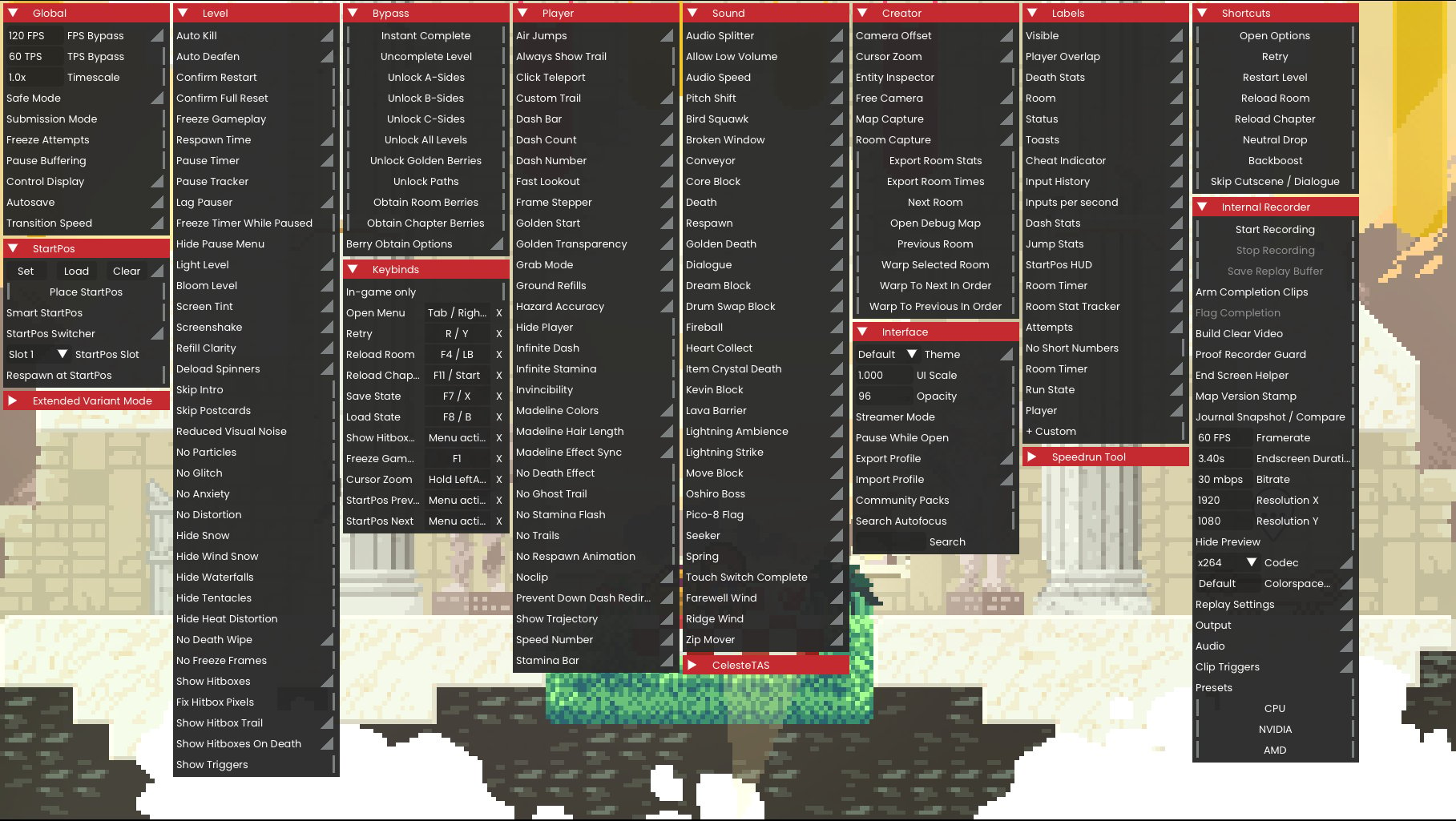 Use [Menu anatomy](/player-guide/menu-anatomy) when you need shared vocabulary for issue reports, suggestions, or screenshots.
## Main Areas
| Area | Use it for |
| ----------------- | ----------------------------------------------------------------------------------------------------------------------------- |
| Global | Current-session controls such as timescale, safe mode, submission mode, control display, and autosave. |
| Level | Level-scoped tools such as Auto Kill, Auto Deafen, freeze, respawn time, visual noise, hitboxes, triggers, and proof helpers. |
| StartPos | Start position capture, placement, slot selection, smart matching, and respawn-at-StartPos behavior. |
| Bypass | Save and completion mutation tools such as instant complete, unlocks, and berry obtain actions. |
| Keybinds | Overlay, menu, and action bindings. |
| Player | Player-facing HUD, movement, visual, resource, and assist controls. |
| Sound | Audio splitter, low-volume bypass, audio speed, pitch shift, and volume controls. |
| Creator | Map inspection, room capture, map capture, room warp, camera, and export tools. |
| Interface | Overlay theme, scale, opacity, Streamer Mode, `.akr` import/export, community packs, and search. |
| Labels | Room labels, input displays, room timer, death stats, custom HUD labels, and label styling. |
| Shortcuts | Open options, retry, reloads, neutral drop, backboost, and cutscene/dialogue skip. |
| Internal Recorder | Video capture, replay buffer, completion clips, proof helpers, output, codec, audio, and preset controls. |
See [External integrations](/feature-guide/external-tools) for Motion Smoothing, Speedrun Tool, CelesteTAS, Extended Variant Mode, and Extended Camera Dynamics rows that appear only when those mods are loaded.
## Search And Popups
Use overlay search when you know the option name. Many rows have a popup or tooltip with configuration values. Changing a popup value stores the setting; the parent row still controls whether that behavior is enabled.
## Policy Badges
Rows can show policy status. Read the badge and any popup suboption badges before enabling a feature.
A clean parent row can contain a stricter suboption. For example, a capture feature can be clean while a timer-freeze suboption is Cheat.
## Safe Overlay Habits
* Check the visible attempt status and policy indicators before enabling features.
* Keep attempt-changing tools in explicit room-lab or testing setups, not submitted-run setups.
* Use Everest's Akron mod options only when you intentionally need an advanced policy preset.
* Use search to find the exact row instead of changing adjacent settings by mistake.
* Export a `.akr` backup before importing shared packs or making broad changes.
## Troubleshooting
If the overlay does not open:
* Check the overlay hotkey in Everest controls.
* Confirm Akron loaded in the mod list.
* Try a different bind if another mod consumes the same input.
If the overlay still does not open, collect the active bind, loaded mod list, and any Everest log errors before reporting the issue.
Use [Menu anatomy](/player-guide/menu-anatomy) when you need shared vocabulary for issue reports, suggestions, or screenshots.
## Main Areas
| Area | Use it for |
| ----------------- | ----------------------------------------------------------------------------------------------------------------------------- |
| Global | Current-session controls such as timescale, safe mode, submission mode, control display, and autosave. |
| Level | Level-scoped tools such as Auto Kill, Auto Deafen, freeze, respawn time, visual noise, hitboxes, triggers, and proof helpers. |
| StartPos | Start position capture, placement, slot selection, smart matching, and respawn-at-StartPos behavior. |
| Bypass | Save and completion mutation tools such as instant complete, unlocks, and berry obtain actions. |
| Keybinds | Overlay, menu, and action bindings. |
| Player | Player-facing HUD, movement, visual, resource, and assist controls. |
| Sound | Audio splitter, low-volume bypass, audio speed, pitch shift, and volume controls. |
| Creator | Map inspection, room capture, map capture, room warp, camera, and export tools. |
| Interface | Overlay theme, scale, opacity, Streamer Mode, `.akr` import/export, community packs, and search. |
| Labels | Room labels, input displays, room timer, death stats, custom HUD labels, and label styling. |
| Shortcuts | Open options, retry, reloads, neutral drop, backboost, and cutscene/dialogue skip. |
| Internal Recorder | Video capture, replay buffer, completion clips, proof helpers, output, codec, audio, and preset controls. |
See [External integrations](/feature-guide/external-tools) for Motion Smoothing, Speedrun Tool, CelesteTAS, Extended Variant Mode, and Extended Camera Dynamics rows that appear only when those mods are loaded.
## Search And Popups
Use overlay search when you know the option name. Many rows have a popup or tooltip with configuration values. Changing a popup value stores the setting; the parent row still controls whether that behavior is enabled.
## Policy Badges
Rows can show policy status. Read the badge and any popup suboption badges before enabling a feature.
A clean parent row can contain a stricter suboption. For example, a capture feature can be clean while a timer-freeze suboption is Cheat.
## Safe Overlay Habits
* Check the visible attempt status and policy indicators before enabling features.
* Keep attempt-changing tools in explicit room-lab or testing setups, not submitted-run setups.
* Use Everest's Akron mod options only when you intentionally need an advanced policy preset.
* Use search to find the exact row instead of changing adjacent settings by mistake.
* Export a `.akr` backup before importing shared packs or making broad changes.
## Troubleshooting
If the overlay does not open:
* Check the overlay hotkey in Everest controls.
* Confirm Akron loaded in the mod list.
* Try a different bind if another mod consumes the same input.
If the overlay still does not open, collect the active bind, loaded mod list, and any Everest log errors before reporting the issue.